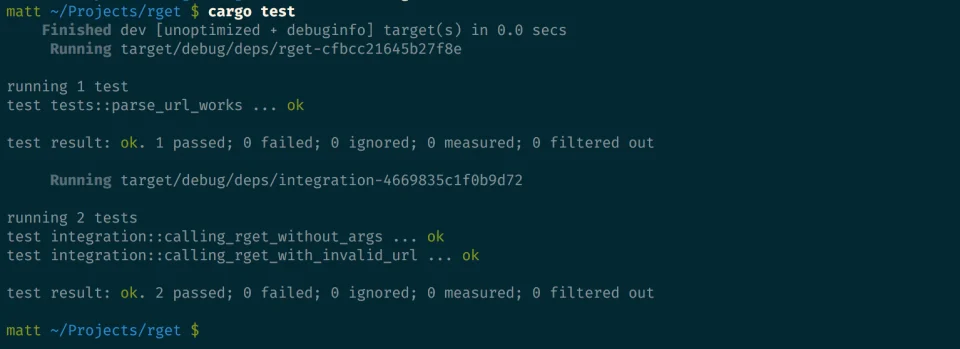
Recently I wrote a post on how to write a CLI application using Rust. This is a follow up post
exploring how to test CLI applications and integrating tests with Cargo, Rust’s build tool.
What
Cargo has builtin support for running both unit and integration tests. It also generates
a tests module template when writing a library. This template makes it quick to get
up and running with writing unit tests in Rust.
#[cfg(test)]
mod tests {
    #[test]
    fn it_works() {
    }
}
The #[cfg(test)] annotation on the tests module tells Rust to compile and run the test code only
when we run cargo test, and not when we run cargo build. This saves compile time when we only want
to build the library, and saves space in the resulting compiled artifact since the tests are not included.
Unit tests (tests that test each unit of code in isolation from the rest of the code) require
little effort to write and reason about since they are very specific. A quick example for a unit
test would to be to test if a function returns the correct value.
// recursive
fn recursive_factorial(n: i64) -> i64 {
    match n {
        0 => 1,
        _ => n * recursive_factorial(n-1),
    }
}

// iterative
fn iterative_factorial(n: i64) -> i64 {
    (1..n+1).fold(1, |acc, x| acc * x)
}

fn main() {
    println!("10!: {}", recursive_factorial(10));
    println!("14!: {}", iterative_factorial(14));
}


#[test]
fn test_recursive_factorial() {
    assert_eq!(recursive_factorial(4), 24);
}

#[test]
fn test_iterative_factorial() {
    assert_eq!(iterative_factorial(4), 24);
}
Integration tests on the other hand are meant to test that many parts of your application work
correctly together, and for this reason they require more effort writing. Units of code that work correctly by themselves could have issues when
integrated, this makes integration tests important. More on this later.
Why
“If we want to be serious about quality, it is time to get tired of finding bugs and start preventing their happening in the first place.”— Alan Page
Some reasons for writing tests would be:
- Improved Quality of Software
- Finding bugs and defects.
- Ensuring a consistent User Experience, by preventing regression.
How
As I mentioned earlier, Unit tests are quite easy to writing as compare to integration tests. I
will therefore outline how to write Integration tests for Rust CLI applications and give two
approaches.
CLI applications are normally invoked as commands on terminal application such as iTerm or cmd.exe.
Testing CLI app functionality then requires a terminal environment emulation. In Rust we can
achieve this by calling our executable via the std::process::Command
interface.
This allows us to gain access to our executable’s:
* environment variable mapping
* stdin
* stdout
* stderr
* exit status
We can then use these to assert that our application behaves as expected when executed.
We normally write our integration tests in a top level tests directory, next to the src
directory. Cargo knows to look for integration test files in this directory.
Below is an example test of an integration tests (for my rget project)
using the std::process::Command interface:
// filename: tests/integration.rs

use std::process::Command;

static WITHOUT_ARGS_OUTPUT: &'static str = "error: The following required arguments were not provided:
    <URL>
USAGE:
    rget [FLAGS] [OPTIONS] <URL>
For more information try --help
";

static INVALID_URL_OUTPUT: &'static str = "Got error: failed to lookup address information:";

mod integration {
    use Command;
    use WITHOUT_ARGS_OUTPUT;
    use INVALID_URL_OUTPUT;

    #[test]
    fn calling_rget_without_args() {
        let output = Command::new("./target/debug/rget")
            .output()
            .expect("failed to execute process");

        assert_eq!(String::from_utf8_lossy(&output.stderr), WITHOUT_ARGS_OUTPUT);
    }

    #[test]
    fn calling_rget_with_invalid_url() {
        let output = Command::new("./target/debug/rget")
            .arg("wwww.shouldnotwork.com")
            .output()
            .expect("failed to execute process");

        assert!(String::from_utf8_lossy(&output.stderr).contains(INVALID_URL_OUTPUT));
    }
}
The std::process::Command
is quite effective at writing our integration tests but becomes quite
repetitive when writing many tests and/or writing tests for different OS platforms since the
executables differ based on the platform.
Here, the assert_cli crate comes
to our rescue. assert_cli allows us to write out integration tests without worrying about the
std::process::Command interface by
abstracting it away for us.
It also provides an intuitive test-oriented interface that makes it easy to reason and write
integration tests.
When we re-write our example integration tests using assert_cli, they become:
// filename: tests/integration.rs

extern crate assert_cli;

static INVALID_URL_OUTPUT: &'static str = "Got error: failed to lookup address information:";

mod integration {
    use assert_cli;
    use INVALID_URL_OUTPUT;

    #[test]
    fn calling_rget_without_args() {
        assert_cli::Assert::main_binary()
            .fails()
            .and()
            .prints_error("error: The following required arguments were not provided:")
            .unwrap();

    }

    #[test]
    fn calling_rget_with_invalid_url() {
        assert_cli::Assert::main_binary()
            .with_args(&["wwww.shouldnotwork.com"])
            .fails()
            .and()
            .prints_error(INVALID_URL_OUTPUT)
            .unwrap();
    }
}
Voila, assert_cli becomes useful in writing integration tests for CLI applications.
The crate’s goal is to provide you some very easy tools to test your CLI applications. It can
execute child processes and validate their exit status as well as stdout and stderr output
against your assertions. For more examples and usages, check out its documentation
Recap
Testing is an important component of Software development. Rust provides support for writing both
unit tests and integration tests and Cargo automatically runs tests for us.
Integration tests are more complex to write compared to unit tests, moreso for CLI applications
that require the emulation of a terminal environment.
Rust provides std::process::Command that makes it simple to call an executable and be able to monitor
it’s environment, input, output and status.
The assert_cli crate makes it easy to write integration tests by abstracting rust internals and
providing a testing oriented interface that makes it easy to read and reason about our tests.